

Playwright+Pytest+Yaml+Allure的UI自动化测试用例框架
背景
Playwright本身不内置完善的用例执行及Log结果管理,
需要引用其他开源库,来形成自动化框架,完善整个自动化执行流程。
UI自动化框架
开源架构地址
Playwright:浏览器自动化工具,实现跨浏览器网页操作与测试。
Pytest:测试框架,管理用例、断言及执行,支持扩展插件。
Allure:可视化测试报告工具,生成结构化结果便于问题追溯。
YAML:配置文件格式,结构化存储测试数据或环境参数。
nb_log:Python日志库,提供灵活日志记录与多线程异步输出
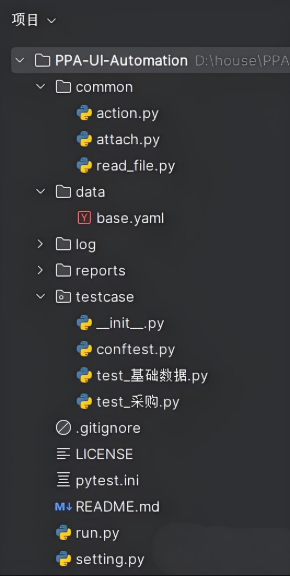
common(公共方法层)
testcase(用例层)
data(数据层)
log(日志层)
reports(报告层)
common公共方法层
该层用于存放用例常调用的函数
action.py(复杂动作封装)
# 点击输入内容
def click_fill(page, local, fills):
	page.locator(local).click()
	page.locator(local).fill(fills)
attach.py(结果处理动作封装)
import allure
from playwright.sync_api import Page

'''
 readAttach:
 入参(page, 路径[./log/screenshot/], 文件名[test_playwright])
'''

# 结果截图与Allure提取
def readAttach(page: Page, paths, fileName):
	page.screenshot(path=paths + fileName + ".png")
	with open(paths + fileName + ".png", "rb") as file:
		allure.attach(file.read(), name=fileName, attachment_type=allure.attachment_type.PNG)
read_file.py(yaml文件读取)
import yaml

from setting import DIR_NAME


def read_yaml(file_path):
    with open(DIR_NAME + file_path, "r", encoding="utf-8") as f:
        return yaml.load(f, Loader=yaml.FullLoader)


if __name__ == "__main__":
    print(read_yaml("/data/base.yaml"))
    print(read_yaml("/data/base.yaml")["test_pytest"]["goto"])
testcase用例层
该层存放自动化用例并用于执行
conftest.py(fixtures)
import allure
from pytest import Item

def pytest_runtest_call(item: Item):
	if item.parent._obj.__doc__:
		allure.dynamic.feature(item.parent._obj.__doc__)

	if item.function.__doc__:
		allure.dynamic.title(item.function.__doc__)
test_基础数据.py
import allure
import pytest

from common.action import click_fill
from common.attach import readAttach
from common.read_file import read_yaml
from playwright.sync_api import Page


@allure.epic("基础数据")
@allure.title("搜索pytest")
def test_pytest(page: Page):
    # 读取yaml文件
    dbinfo = read_yaml("/data/base.yaml")
    # 打开地址
    page.goto(dbinfo["test_pytest"]["goto"])
    # 搜索框输入内容
    click_fill(page, "#kw", dbinfo["test_pytest"]["fills"])
    # 点击'百度一下'
    page.get_by_role("button", name="百度一下").click()
    # 截图结果并保存到log与allure
    readAttach(page, dbinfo["test_pytest"]["path"], dbinfo["test_pytest"]["fileName"])


@allure.epic("基础数据")
@allure.title("搜索allure")
def test_allure(page: Page):
    dbinfo = read_yaml("/data/base.yaml")
    page.goto(dbinfo["test_allure"]["goto"])
    click_fill(page, "#kw", dbinfo["test_allure"]["fills"])
    page.get_by_role("button", name="百度一下").click()
    readAttach(page, dbinfo["test_allure"]["path"], dbinfo["test_allure"]["fileName"])
test_采购.py
import allure
from common.attach import readAttach
from playwright.sync_api import Page


@allure.epic("采购模块")
@allure.title("搜索playwright")
def test_playwright(page: Page):
    page.goto("https://www.baidu.com/")
    page.locator("#kw").click()
    page.locator("#kw").fill("playwright")
    page.get_by_role("button", name="百度一下").click()
    readAttach(page, "./log/screenshot/", "test_playwright")
Data数据层
该层用于存储业务层数据变量,方便后续维护与调整。如:数据不适用能更快速找到位置更改
注:一个用例配一个yaml
base.yaml
test_pytest:
  goto: https://www.baidu.com/
  fills: pytest
  path: ./log/screenshot/
  fileName: test_pytest
test_allure:
  goto: https://www.baidu.com/
  fills: allure
  path: ./log/screenshot/
  fileName: test_allure
pytest.ini
[pytest]
# 全集测试
addopts = -vs --alluredir=./reports/tmp --clean-alluredir
# 冒烟测试
;addopts = -sv -m smoke --alluredir ./reports/apiReport --clean-alluredir
testpaths = ./testcase
python_files = test_*.py
python_classes = Test*
python_functions = test_*
markers =
    smoke
run.py
import os

import pytest

if __name__ == "__main__":
    pytest.main()
    os.system("allure generate ./reports/tmp -o ./reports/UIReport --clean")
    # 本地启动打开Allure报告HTML
    os.system("allure serve ./reports/tmp")
setting.py
import os

DIR_NAME = os.path.dirname(os.path.abspath(__file__))
print(DIR_NAME)
日志层、报告层(运行后自动生成)
自动化测试报告框架Allure
Allure是一款轻量级、高度灵活的开源测试报告框架,专为自动化测试设计,能够生成美观、结构清晰的测试报告,广泛应用于现代软件测试流程中。
Allure最初由Yandex团队开发,后逐渐演变为开源项目,支持多种主流测试框架和语言:
多语言支持:兼容Java、Python、JavaScript等语言,支持TestNG、Pytest、JUnit等多种测试框架
结构化报告:将测试用例、断言、附件、步骤等信息组织为可视化层级结构,提升可读性
交互式界面:提供图表统计、生命周期追踪、失败详情分析等功能,便于定位问题
Allure的核心优势在于其清晰的测试步骤分层和丰富的注解支持,解决了传统文本日志和简单HTML报告难以满足的可视化与结构化分析需求
用例管理框架——Pytest
Pytest是一个功能强大且易于使用的Python测试框架,由Holger Kreinbach开发并维护。它最初作为unittest的替代方案出现,现已发展成为Python社区事实上的标准测试工具。Pytest的设计理念是"约定优于配置",通过简单的命名规则和清晰的语法结构,大幅降低了测试代码的编写和维护成本
Pytest的核心优势在于其极简的使用体验和强大的功能覆盖。与传统的unittest框架不同,Pytest无需开发者编写复杂的类结构,也不需要记忆特定的测试方法命名规则。开发者只需按照正常的函数编写逻辑,就能轻松创建测试用例。在断言环节,Pytest完全支持Python原生的断言语法,无需学习和使用特定的断言方法,大大降低了学习成本
架构部署
Python环境安装
略
Java环境安装
略
pyaml+playwright+Pytest软件包安装
pip install pyaml
pip install playwright
python -m playwright install chromium
pip install allure-pytest
pip install pytest
pip install pytest-playwright
Allure安装
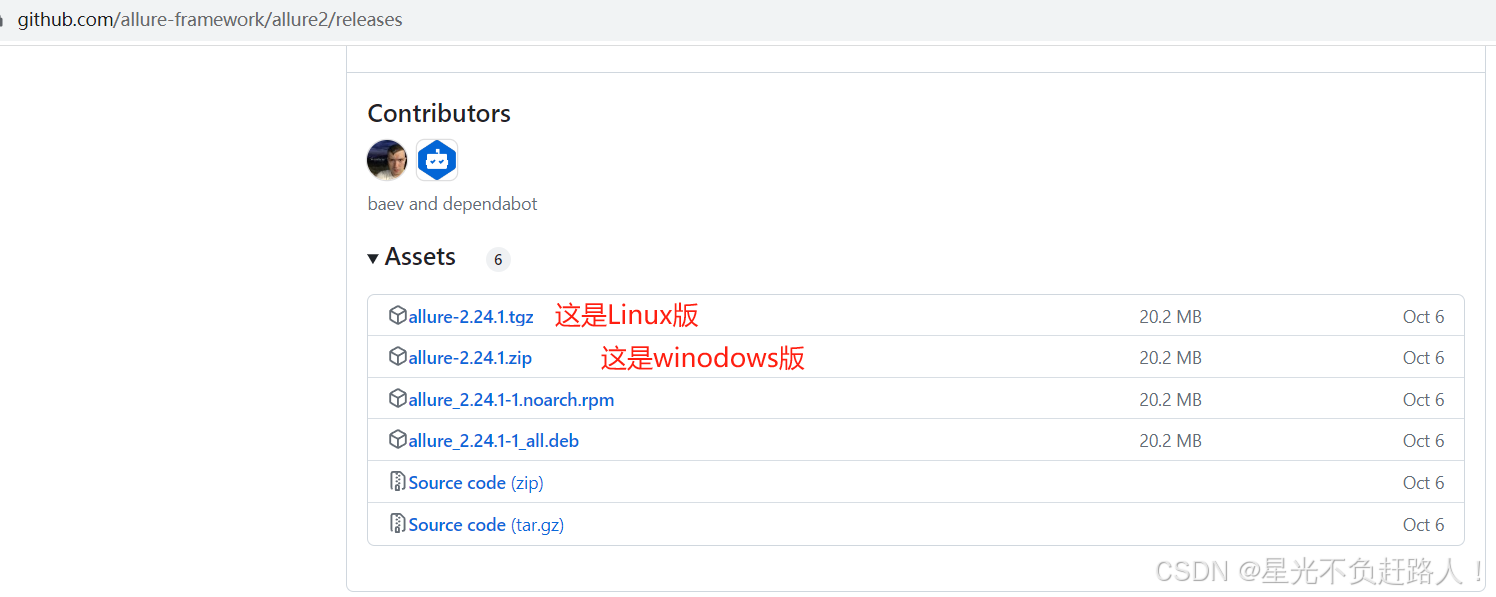
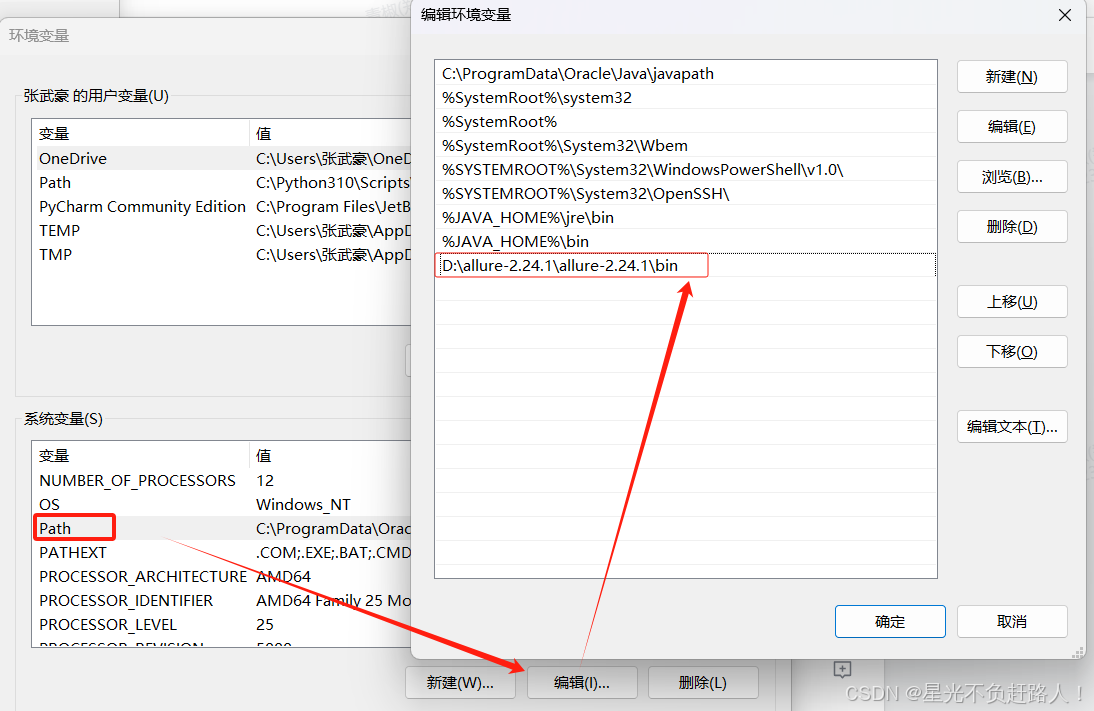
在本地解压下载好的allure包,解压后有4个文件夹,复制bin文件夹目录路径,并用其设置allure环境变量,添加到Path变量中:
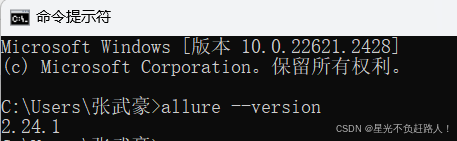
allure --version 出现下图所示版本号即代表安装成功
参考资料